In the last few days, social media and several online reports have been flooded with claims that Google is using users’ Gmail emails and attachments to train its Gemini AI model. Many users believed that Google had silently updated its policy, and that Gmail content would now directly contribute to AI model training—unless users manually disabled Gmail’s “smart features.”
However, Google has now publicly denied these claims and clarified that the reports circulating online are misleading. According to the company, Gmail content is not used to train Gemini AI, and the settings users recently saw were part of long-standing smart features that have existed for years.
This article breaks down the entire controversy, Google’s official clarification, what triggered the misunderstanding, and what the new Gmail settings actually do. If you were confused about your Gmail privacy and how Google uses your personal data, here is the complete truth.
Google Responds to Gmail AI Training Rumours
A spokesperson for Google, Jenny Thomson, told The Verge that the trending reports are inaccurate and do not reflect Google’s actual data policies. According to her statement:
“These reports are misleading – we have not changed anyone’s settings. Gmail Smart Features have existed for many years, and we do not use your Gmail content for training our Gemini AI model.”
This means:
- Your private Gmail messages
- Your attachments
- Your personal conversations
- Your email history
None of these are used to train Gemini or any other Google AI foundation model.
Google emphasised that the recent confusion was caused by the placement and wording of Gmail’s smart feature settings, which may have resurfaced for some users, making it appear as though a new update had been rolled out.
What Are Gmail Smart Features, and Do They Affect AI Training?
Gmail’s smart features have been part of the service for several years. These features analyze email content to make your Gmail experience easier and more personalized. Some of these features include:
- Automatic email categorization (Primary, Social, Promotions)
- Spam filtering
- Smart Reply suggestions
- Spell check and grammar suggestions
- Tracking online orders
- Automatically adding travel bookings or events to Google Calendar
- Surfacing Drive documents inside Gmail
Google confirmed that these features do analyze message content, but this analysis:
✔ Happens only on your device or in Google’s system for product functionality
✔ Does not send your email data for Gemini AI training
✔ Does not contribute to large-scale AI datasets
In short, Gmail smart features are simply product tools—not AI training tools.
Why Did People Think Gmail Was Training AI?
This confusion began when an article from the cybersecurity company Malwarebytes claimed that Gmail content may be used to train Google’s AI models. The article spread quickly across social media, causing panic among users who were already concerned about AI-related privacy issues.
However, Malwarebytes later updated its article and admitted that it “contributed to a perfect storm of misunderstanding.”
Here’s what the company corrected:
- The smart feature settings are old, not new
- Gmail does scan content, but only for user-facing features
- This scanning is separate from AI model training
- Google’s documentation shows the settings are opt-in, not automatically enabled for AI training
Still, the initial misunderstanding had already gone viral, which forced Google to step in with an official clarification.
The Real Update: What Did Google Actually Change?
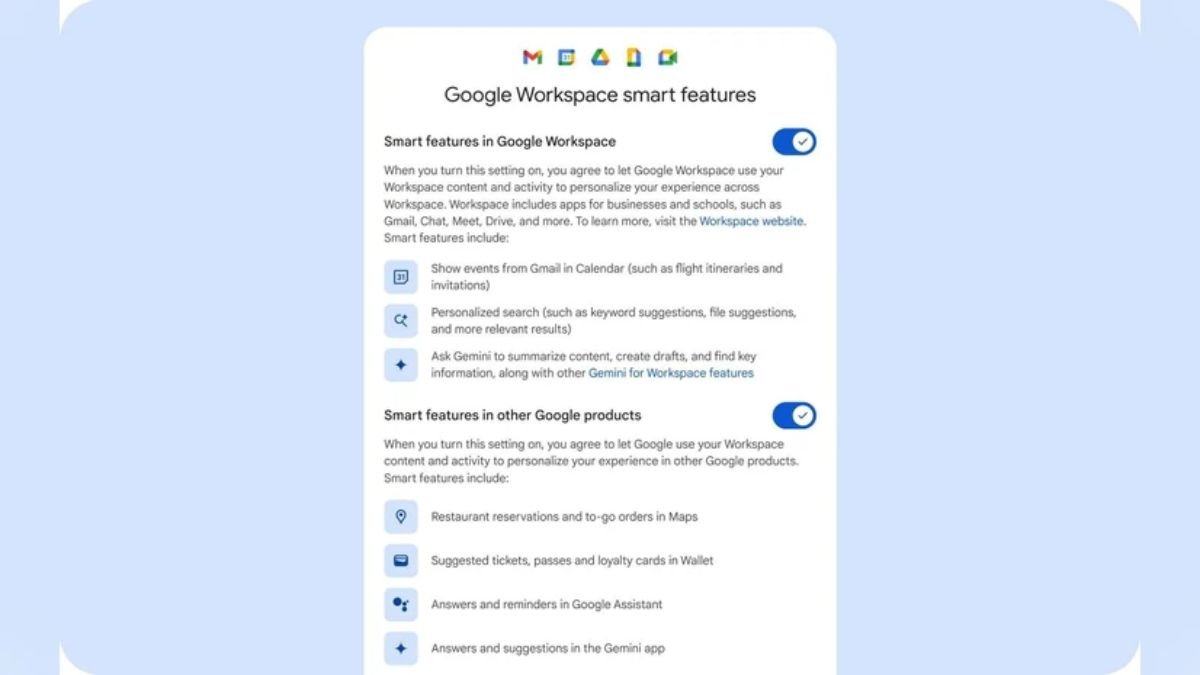
While Google has not changed its data sharing or AI training policies, the company did roll out an update in January that reorganized Gmail personalization controls. These settings were split into two categories:
1. Personalization within Google Workspace
This covers apps like:
- Gmail
- Google Calendar
- Google Contacts
- Google Meet
This setting controls features like adding flights or event details from Gmail directly into Calendar or showing suggested files from Drive.
2. Personalization across other Google products
This includes:
- Google Maps
- Google Wallet
- Google Chrome
- Google Search
This setting determines whether Gmail data can help personalize non-Gmail services, such as saving loyalty card information to Wallet or suggesting relevant actions in other apps.
Google clearly stated that these changes were made to give users better transparency and control, and not to change how Gmail data is handled or used.
Does Gmail Content Feed Into Gemini AI Training? Google Says No.
Google reiterated multiple times that Gmail data is not used to train Gemini AI models. The company insists that:
- Gmail’s “smart features” operate independently
- Data used for smart suggestions stays within product functionality
- Gemini AI training relies only on public data, licensed data, and user input from products designed for it—not Gmail
This means your email inbox remains private, just as it has always been.
Why This Matters for Users
With increasing concerns about digital privacy, AI model training, and how companies handle user data, it’s understandable why this controversy gained so much attention. Emails often contain deeply personal information: financial statements, medical details, private discussions, legal documents, and more. The idea of these being used for AI training is understandably alarming.
Google’s clarification offers relief for users who depend on Gmail daily and expect their communication to remain confidential.
Final Verdict: Gmail Is Not Training Gemini AI—You’re Still in Control
The recent buzz around Gmail using emails for AI training is based on misunderstandings, not reality. Google has made it clear that:
- No Gmail content is used to train Gemini
- Smart features are old and operate independently
- Recent setting changes were about transparency, not data usage
- Users remain fully in control of what personalization features they want to enable
If you’re worried about your privacy, you can still review or adjust your Gmail smart feature settings anytime. But one thing is certain: your Gmail inbox is not being used to train Google’s AI models.