Google Photos has started rolling out a major update for both Android and iOS users, introducing a completely revamped video editing experience. The update brings powerful new tools for creating highlight videos, editing multi-clip timelines, adding text overlays, and choosing from a wide library of soundtracks. With these upgrades, Google aims to make video creation easier, faster, and more intuitive for everyday users, content creators, and social media enthusiasts.
If you regularly edit videos on your smartphone or love sharing highlight reels from vacations, events, or special moments, this update to the Google Photos app is a game changer. Here’s a complete breakdown of the new features, how they work, and why this update is getting so much attention.
Google Photos Introduces New Video Creation Tools on Android
Create Highlight Videos with Ready-Made Templates
One of the biggest additions to Google Photos on Android is the ability to create highlight videos using built-in templates. Google has added multiple pre-designed templates that already include music, transitions, text, and cut patterns.
All you need to do is select your photos and video clips, and the app automatically generates a polished highlight video within seconds.
This feature is perfect for:
- Birthday highlights
- Travel videos
- College events
- Festive celebrations
- Social media reels and shorts
The template-based approach ensures that even beginners can create professional-looking videos without spending hours editing manually.
Universal Timeline and Multi-Clip Editing Now on Android & iOS
Google Photos now includes a refreshed video editor with a universal timeline UI. This means whether you’re using an Android phone or an iPhone, the editing layout and controls look the same.
What’s New in the Updated Video Editor?
- Edit multiple clips together
- Trim and rearrange videos easily
- Adjust transitions seamlessly
- Add or remove photos and clips with full manual control
The unified timeline makes the entire editing experience smoother and more flexible, giving users the kind of control that was previously available only in professional editing apps.
Whether you are editing a vlog or piecing together event clips, this update offers ease and precision for both platforms.
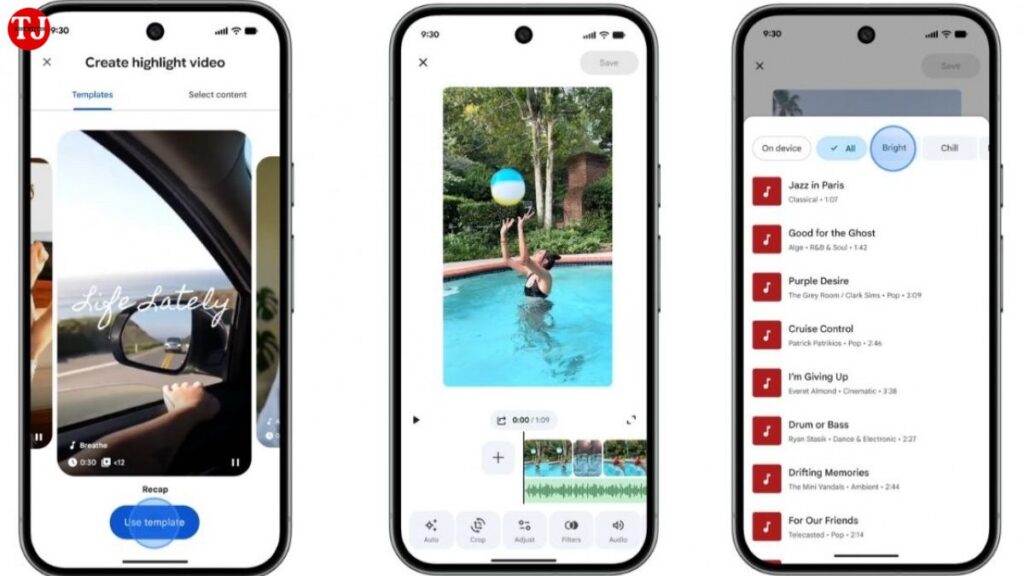
Soundtrack Picker with Categorized Music Library
Another major highlight of this rollout is the new soundtrack picker, available for both Android and iOS users.
Features of the Soundtrack Picker:
- Curated music library
- Categorized playlists (travel, family, upbeat, cinematic, etc.)
- Easy one-tap music selection
- Auto-adjusted music timing
This allows users to add the perfect mood to their video without searching for external music or manually syncing tracks. Google has ensured that the library is diverse enough to suit different video styles—from emotional montages to high-energy reels.
Android Users Get New Text Overlay Options
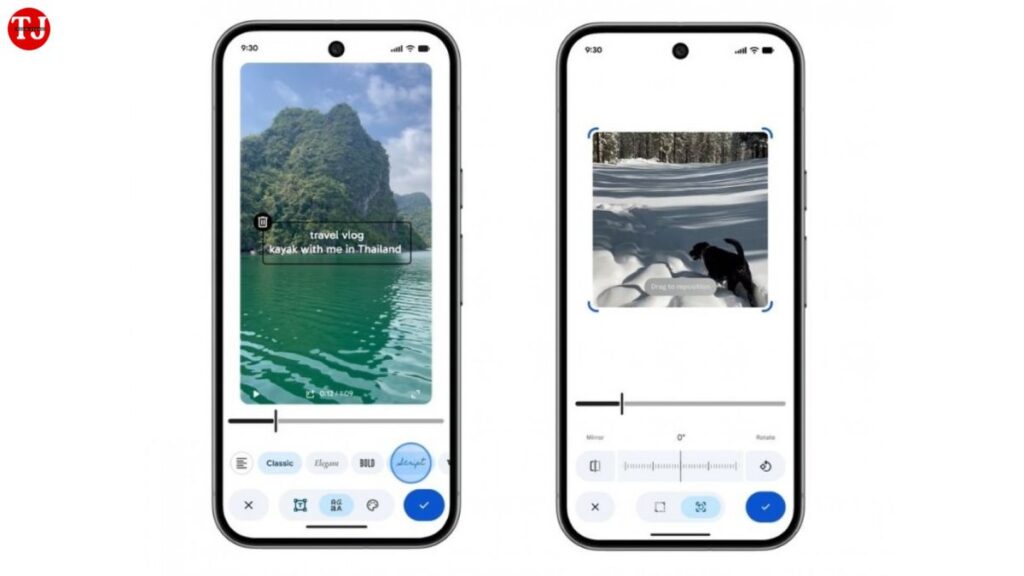
In addition to templates and advanced editing tools, Android users now get a powerful text overlay feature to enhance their highlight videos.
Customization Options Include:
- Multiple font styles
- Different text colors
- Stylish formatting options
- Positioning and resizing tools
This gives you the freedom to add personalized messages, captions, dates, locations, or titles directly on your video. Whether you’re making a birthday video or a travel recap, text overlays help add context and storytelling elements.
Revamped Video Editor Becomes Default on Android
Google has confirmed that the upgraded video editor is now the default editing experience on Android. This means users won’t need to switch to any additional interface or install extra tools.
What This Means for Users:
- Faster access to editing tools
- Smooth integration of music, text, and clips
- Modern UI for easier navigation
- Consistent editing experience across all highlight videos
The aim is to streamline the video creation process and bring all major tools under one unified design.
Why This Update Matters for Users
Google Photos is already one of the most widely used apps for backing up and managing media. But with this update, Google is positioning it as a complete video-creation platform.
Benefits for Users
- Beginner-friendly editing: Templates and automated tools save time.
- Professional-style results: Multi-clip editing and timelines offer more creative control.
- Perfect for social media: Quick export options make sharing easy on Instagram, YouTube Shorts, Facebook, and WhatsApp Status.
- No need for third-party apps: Many users can now skip apps like CapCut, InShot, or VN for basic to intermediate editing tasks.
For casual users, it’s a simple way to create beautiful memories. For content creators, it is a fast tool for producing short-form videos on the go.
Final Thoughts
With these new video creation and editing tools, Google Photos is evolving beyond a basic storage app into a lightweight but powerful video editor. The addition of highlight templates, soundtrack picker, multi-clip editing, and text overlays significantly enhances the app’s capabilities for both Android and iOS users.
Whether you’re editing festival memories, creating travel highlights, or stitching together family moments, the new Google Photos update offers everything you need for quick, clean, and stylish video creation—right from your mobile device.