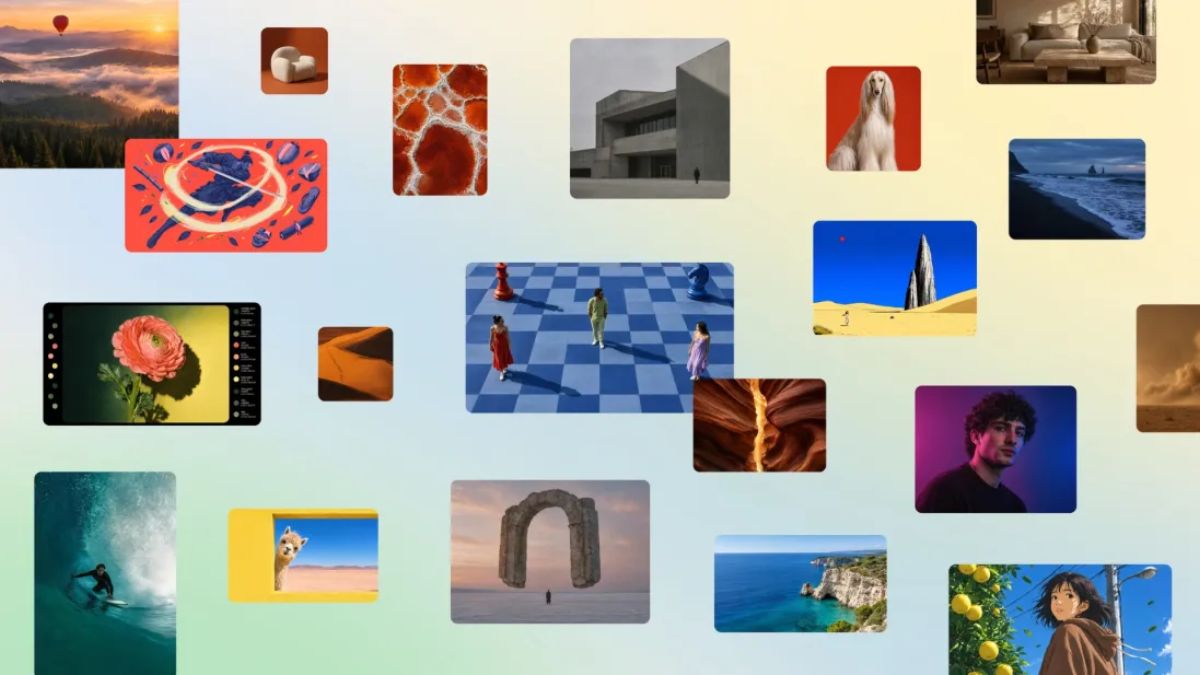
Canva has launched Canva Craft, its first in-house AI image generation model, designed to create visuals with more accurate layouts, clearer text and greater control over individual elements. Developed by Canva Research, the model uses a two-stage generation process that plans an image’s composition before rendering the final result at resolutions of up to 2K.
The launch marks a new step in Canva’s artificial intelligence strategy. Rather than relying entirely on third-party image generation models, the design platform is developing its own technology for creating graphics, promotional materials, social media posts and other visual content. Canva Craft is available through Dream Lab and Canva’s public API, while integration with AI assistants through Canva’s Model Context Protocol (MCP) has been announced as a forthcoming capability.
Canva Craft Brings a New Approach to AI Image Generation
Canva is expanding its AI capabilities with the launch of Canva Craft, a proprietary image generation model built by its in-house research team. The technology is designed to address an important challenge in generative AI: producing images that follow detailed instructions while maintaining accurate object placement, visual hierarchy and readable text.
Most users of AI image generators are familiar with entering a prompt and receiving a finished image. However, creating a polished poster, advertisement or infographic requires more than producing an attractive picture. Text must appear in the correct place, objects need to maintain appropriate proportions, and the overall composition must suit the intended format.
Canva says Craft is designed with these requirements in mind. Its architecture separates image planning from image rendering, allowing the system to establish the structure of a composition before generating the final visual.
The model is intended for a range of creative applications, including marketing graphics, social media content, presentations, typography-heavy designs and other visual projects.
How Canva Craft’s Two-Stage AI Model Works
One of the main features of Canva Craft is its two-stage approach to image generation. Instead of translating a prompt directly into pixels, the system first develops a plan for the image and then uses that plan to render the result.
Stage 1: Understanding the prompt and planning the layout
In the first stage, the model interprets the user’s instructions and determines how the requested elements should be arranged.
Its planning process considers factors such as:
- The objects and visual elements that should appear.
- The spatial relationships between different elements.
- The relative size and scale of objects.
- Visual hierarchy and the positioning of important content.
- The placement and generation of text within the composition.
This approach is particularly relevant to designs where several elements must work together. For example, a promotional poster may need a headline at the top, a product image in the centre and supporting information near the bottom.
By planning these relationships before rendering, Craft aims to reduce errors that can make generated designs difficult to use without further editing.
Stage 2: Generating the final image
Once the planning stage is complete, a separate image-rendering model turns the composition plan into a finished visual.
Canva says Craft can generate images at resolutions of up to 2K and supports more than 30 aspect ratios. This gives users flexibility when creating assets for different platforms and design formats.
The separation between planning and rendering is intended to improve the relationship between a user’s instructions and the final output. However, the quality of individual results can still vary depending on the prompt and the complexity of the requested design.
Canva Craft Features: Resolution, Text and Editing
Canva Craft is focused on more than producing visually appealing images. Its features are designed to make generated content useful within a broader design workflow.
Up to 2K image resolution
Craft supports image generation at up to 2K resolution. This provides creators with detailed visual assets for digital projects, promotional material and other design work.
The actual output dimensions and suitability will depend on the selected format and intended use. A 2K image should not automatically be treated as a substitute for every high-resolution print or production requirement.
More accurate text rendering
Text has traditionally been a difficult element for many image generation systems. A model might produce an attractive poster but render a heading incorrectly, distort individual letters or place text in an unsuitable position.
Canva’s planning-based architecture is designed to improve text placement and legibility by accounting for typography as part of the composition process. This could be particularly useful for posters, menus, infographics, presentations and social media graphics.
The capability does not mean every generated word will always be correct. Users should still check spelling, numbers, brand names and other important text before publishing an image.
Flexible aspect ratios
Craft supports more than 30 aspect ratios, allowing generated images to fit different visual formats.
| Use case | Potential benefit |
|---|---|
| Social media posts | Create graphics in suitable layouts for different platforms |
| Promotional posters | Arrange headlines, imagery and supporting information |
| Presentations | Generate visuals that fit slide compositions |
| Infographics | Organise multiple visual elements and text |
| Marketing assets | Develop graphics for campaigns and product promotion |
These are potential applications of the model’s stated capabilities, not a guarantee that every generated image will be publication-ready without editing.
More precise image edits
Canva says Craft is designed to support precise edits without unnecessarily changing other parts of an image. This is important when a user wants to adjust a particular element while preserving the overall composition.
For example, a creator may want to change a background object, adjust a visual detail or refine part of a promotional graphic without rebuilding the entire image.
The degree of control available will depend on the editing workflow and the specific result. Users should review edited images to ensure that the changes do not introduce inconsistencies elsewhere.
Canva Trained Craft on Designs Rather Than Just Photographs
Another notable aspect of Canva Craft is the type of material used in its training.
According to the company, the model was trained using human-designed templates from Canva’s library, including posters, social media posts, presentations, infographics, menus and typography-rich layouts.
This reflects a different emphasis from image generation systems primarily focused on photographic content. Canva’s approach centres on understanding how visual elements work together in structured designs.
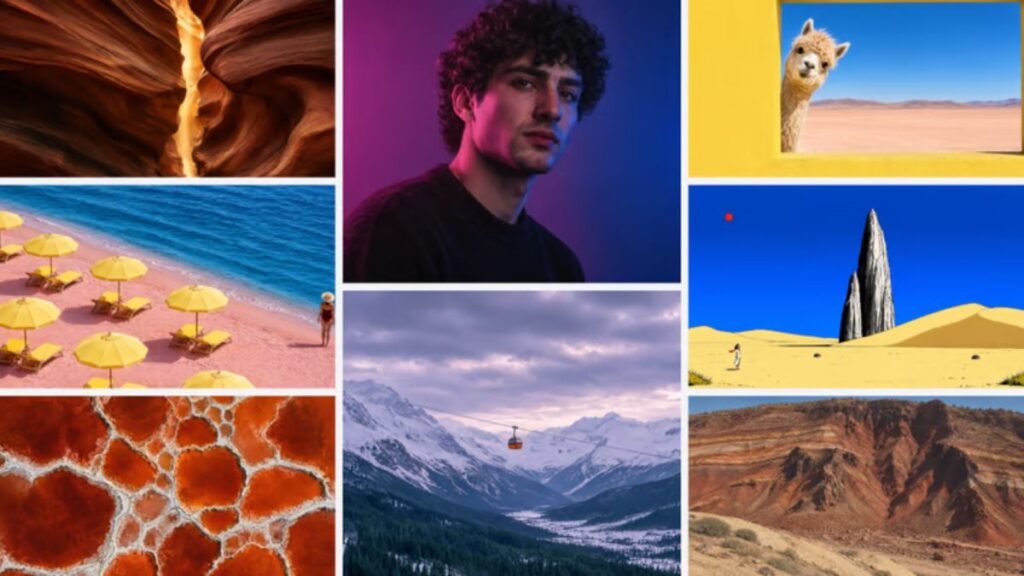
The distinction matters because a well-composed design often needs to balance several requirements at once. A poster, for instance, must combine imagery, typography, spacing and visual hierarchy. An infographic must make information easy to follow, while a marketing graphic may need to draw attention to a specific product or message.
Training on designed layouts is intended to help Craft handle these relationships more effectively. It also aligns the model with Canva’s broader purpose: helping users turn ideas into finished visual communication materials.
The training approach alone does not establish that Craft will outperform competing models in every category. Its practical value will depend on the quality, consistency and editability of the results users obtain.
Integration With Canva Magic and the Company’s Design Tools
Canva Craft is part of a broader AI design ecosystem rather than a standalone image generator.
The company has developed technology that can interpret designs and their layers. Generated images can potentially be converted into more editable design elements using Canva’s Magic Layers technology, helping users move from a flattened image toward a structured design.
This could be useful when an initial generated image is close to the desired result but still requires adjustments. Instead of treating the image as a finished, unchangeable asset, users can work towards a design that better fits their needs.
For people creating marketing campaigns, social posts or presentations, the combination of image generation and further editing could be more practical than a workflow that ends with a single exported picture.
However, the extent to which individual elements can be separated and edited will depend on the conversion process and the image itself.
Canva Craft Availability: Dream Lab and API Access
Canva has made Craft available through its design platform and public API, giving both everyday creators and developers a way to access the model.
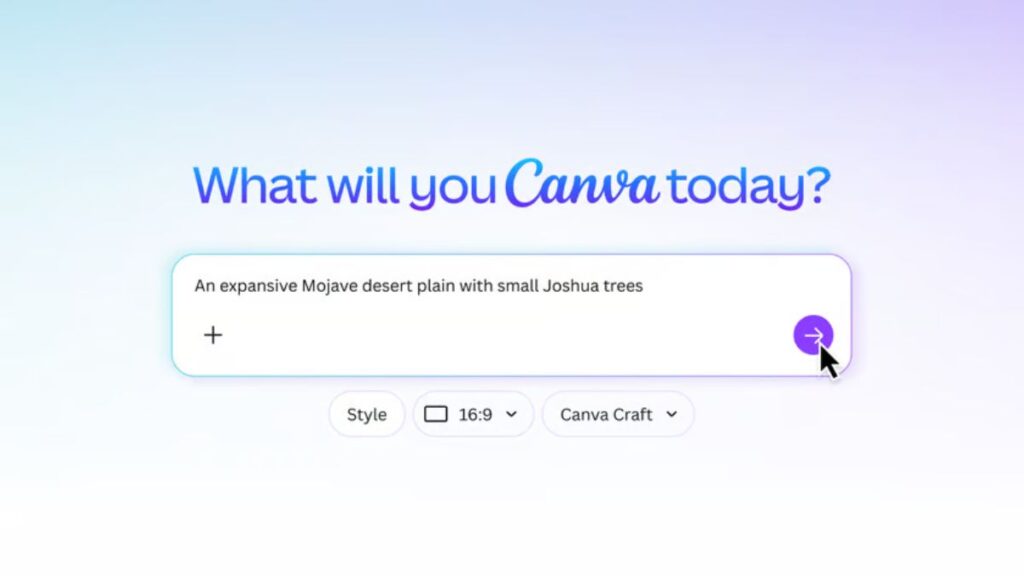
How to access Canva Craft through Dream Lab
Users can start by opening Canva and navigating to Dream Lab, its AI image-generation experience.
The general workflow is straightforward:
- Open Canva and navigate to Dream Lab.
- Enter a prompt describing the image or design you want to create.
- Review the generated result.
- Refine the prompt or make further edits if necessary.
- Use the resulting visual in a suitable Canva design.
The quality of the output depends partly on how clearly the prompt communicates the subject, layout, visual style and required text.
API access for developers
Canva Craft is also available through Canva’s public API. This provides a route for developers and product teams to explore image generation within their own applications and workflows.
Possible applications include marketing platforms, e-commerce tools, advertising systems and services that need to generate visual assets programmatically.
Developers should check Canva’s current API documentation for authentication, permissions, supported formats, usage allowances and any preview restrictions before implementing the model in a production application.
ChatGPT and Gemini integration
Canva has also announced plans to support Craft through its Model Context Protocol (MCP), which can connect Canva capabilities with compatible AI assistants and automated workflows.
This could eventually allow users to request an image as part of a broader task involving an AI assistant, rather than switching manually between separate tools. Canva’s announcement described this integration as forthcoming, so it should not be presented as a fully available feature for every user.
Why Canva Is Developing Its Own Image Generation Model
Developing an in-house image model gives Canva more control over how image generation fits into its product.
Before Craft, the platform used multiple image generation models. Operating its own model could help Canva manage the costs associated with third-party services while giving its research team more direct control over image quality, generation speed and the user experience.
Canva has specifically highlighted cost efficiency, quality and speed as reasons for developing its own technology.
This is relevant for a platform that serves a large and diverse user base. AI image generation requires computing resources, and the cost of generating images can become significant when a service handles a high volume of requests.
An internally developed model could give Canva greater flexibility to optimise the system for its own creative workflows. However, the actual financial impact will depend on factors such as operating costs, usage, infrastructure requirements and the performance of the model in real-world conditions.
Leonardo.ai’s contribution
Canva acquired the generative media platform Leonardo.ai in 2024. Researchers from Leonardo contributed to the development of Craft, according to the source reporting on the launch.
The involvement of that research team adds to Canva’s existing investment in generative AI. Craft represents another step in the company’s effort to develop technology tailored to visual design rather than relying exclusively on external image-generation providers.
Canva Craft vs Other AI Image Generators
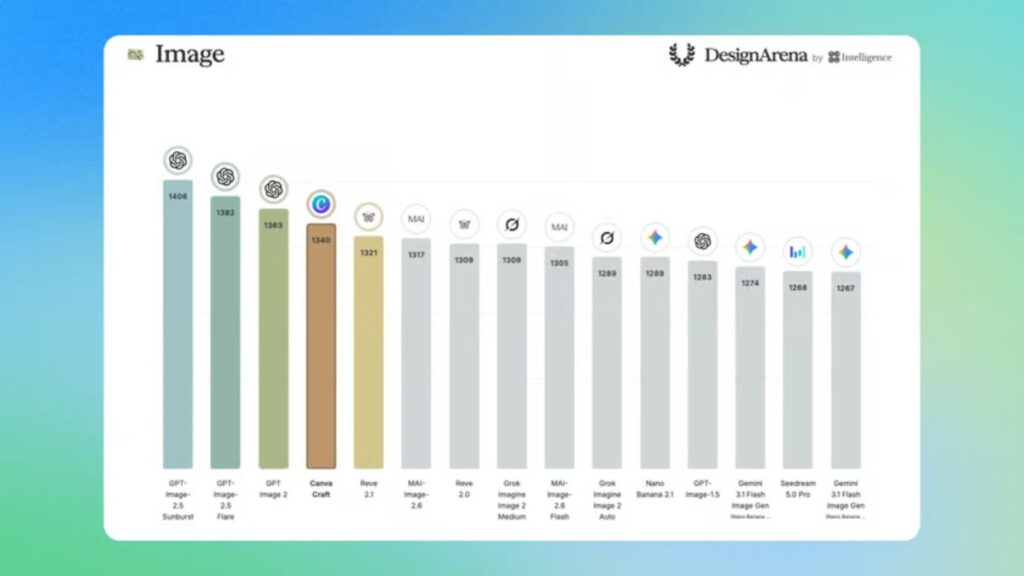
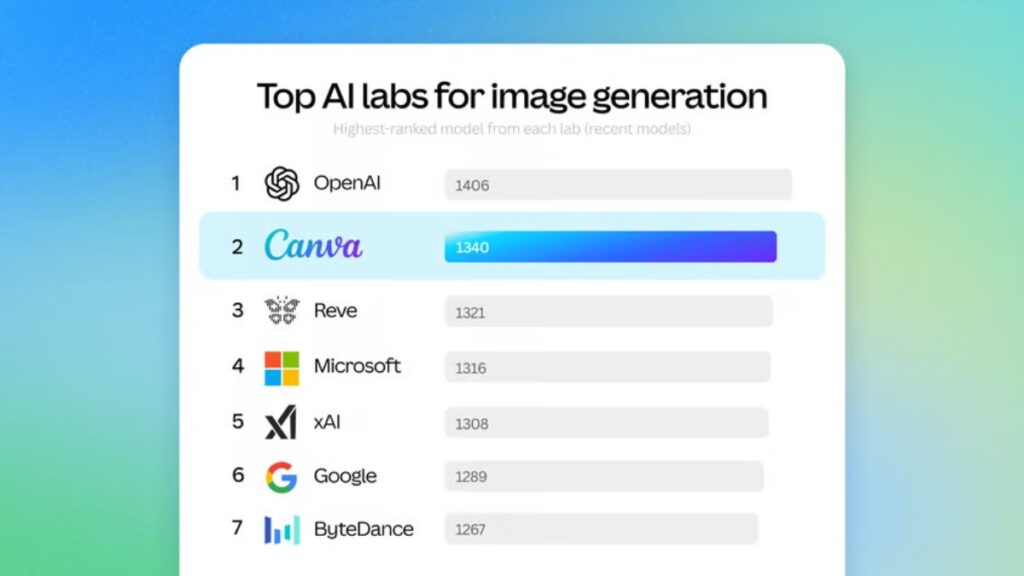
Canva Craft enters a competitive market that includes image-generation tools from companies such as OpenAI, Google, ByteDance and Meta.
Its most distinctive stated focus is structured visual composition: planning the placement of elements and text before rendering an image. That emphasis makes it particularly relevant to users creating practical design assets rather than only standalone artwork.
| Feature | Canva Craft |
|---|---|
| Model developer | Canva Research |
| Maximum stated resolution | Up to 2K |
| Generation approach | Two-stage planning and rendering |
| Aspect ratios | More than 30 |
| Primary focus | Design-oriented image generation |
| Access | Canva Dream Lab and public API |
| AI assistant integration | Canva MCP integration announced as forthcoming |
| Faster variants | Craft-fast and Craft-ultrafast in development |
This table describes the capabilities reported for Canva Craft. It is not a direct performance benchmark against competing products.
Choosing an image generator depends on the task. Someone creating a poster or marketing graphic may prioritise text placement and layout control, while another user may focus on photorealism, artistic style or the ability to make complex edits.
A meaningful comparison would require testing the same prompts across the different tools and evaluating text accuracy, image quality, instruction following, editing consistency, speed and cost.
Craft-fast and Craft-ultrafast: What Comes Next?
Canva is developing two additional versions of its image generation model called Craft-fast and Craft-ultrafast. The company has described these variants as more cost-efficient alternatives intended to deliver faster or less expensive generation.
These versions could make the technology more practical for workflows that require frequent image generation, including marketing campaigns and high-volume creative production.
For users, the important considerations will be how much faster the models operate, whether they maintain the quality of the original version, and what their usage costs look like.
Canva has not established in the cited launch announcement a definitive public release date for both variants. Their availability and detailed performance should therefore be checked against subsequent official updates.
What Canva Craft Means for Creators and Businesses
Canva Craft could be useful for people who regularly create visual content but do not have advanced graphic design skills.
Small businesses may use AI-generated graphics for promotional campaigns, while bloggers and publishers could explore the technology for article illustrations, social media creatives and infographics. Marketing teams may also benefit from generating images in different aspect ratios for multiple campaigns.
The potential advantage is the combination of image generation with Canva’s existing editing environment. Users can generate a starting point and then refine the result within the same design workflow.
There are still practical limitations to consider. AI-generated images may contain incorrect text, inconsistent details or visual elements that need manual correction. Businesses should also review image suitability, brand consistency and applicable usage terms before publishing generated assets.
For professional projects, Canva Craft is best evaluated as part of a complete design workflow rather than as a replacement for every stage of human design and review.
Specifications and Feature Summary
| Specification | Details |
|---|---|
| Model name | Canva Craft |
| Developer | Canva Research |
| Model type | AI image generation |
| Architecture | Separate planning and rendering stages |
| Maximum stated resolution | Up to 2K |
| Aspect ratios | More than 30 |
| Training material | Human-designed Canva templates |
| Editing workflow | Integration with Canva’s design ecosystem |
| Current access | Dream Lab and public API |
| Planned capabilities | MCP integration and faster model variants |
Source: Canva’s official announcement and developer documentation.
Original Editorial Analysis
Canva Craft’s most interesting aspect is not simply that Canva has launched another AI image generator. It is the company’s decision to focus its model on the structure of a finished design.
Many creative tasks require more than a visually attractive image. A business poster must communicate information clearly, a menu needs readable text, and an infographic must organise content in a logical order. Canva’s planning-first architecture is intended to address these requirements.
The strategy could also benefit Canva at the product level. Developing an in-house model may provide greater control over performance, costs and integration with existing design tools. The public API creates another opportunity to make the technology useful beyond Canva’s own interface.
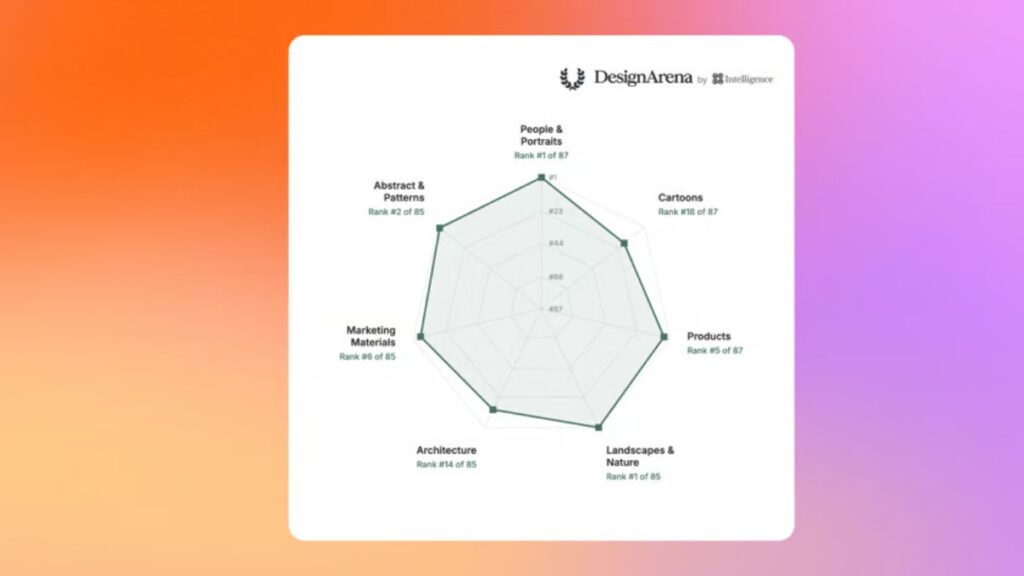
However, the launch announcement alone cannot establish whether Craft consistently produces better results than competing systems. That would require independent testing across comparable prompts, particularly for text accuracy, detailed editing, image quality and generation speed.
For now, Canva Craft is worth watching for creators who prioritise structured layouts and practical design workflows. Its long-term value will depend on how reliably it translates detailed instructions into usable, editable visuals.
Conclusion
Canva Craft introduces a new approach to AI image generation by combining composition planning with image rendering. With output of up to 2K resolution, support for more than 30 aspect ratios, and access through Dream Lab and a public API, the model is designed for creators who need more than a standalone image.
Its focus on layout, typography and editing makes it particularly relevant to social media graphics, posters, infographics and marketing materials. Planned MCP integration and the development of faster model variants could expand its usefulness further.
The key question now is how well Craft performs in everyday creative work. For users considering an AI design tool, testing it with real prompts and checking the resulting images carefully will be more useful than relying on feature claims alone.
